1 Your role & what you can access
Reviewers protect the quality of the conference — and only ever see the papers linked to them.
- Evaluate submissions fairly and objectively
- Keep every manuscript confidential
- Avoid conflicts of interest
- Submit before the review deadline
- Give constructive, actionable feedback
Your recommendation advises the chair — it does not decide the outcome. Only the organizer or program chair publishes the final decision.
What you can see
| Content | Reviewer access |
|---|---|
| Papers assigned to you | Full access in My Reviews |
| Other papers of the conference | Not listed, not accessible |
| Manuscript under Double Blind | Anonymised copy only — the original file returns 403 |
| Authors' identities, other reviewers, decisions | Not visible |
| Your own submitted reviews | Visible as rounds (Round 1, Round 2 …) |
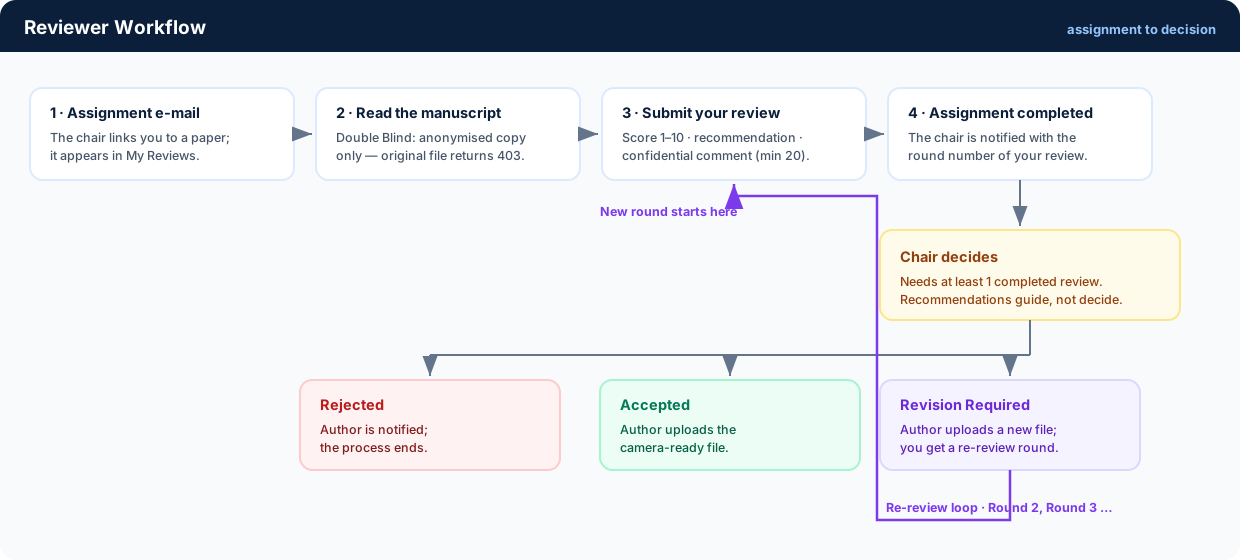
2 Receive & open an assignment
A chair links you to a paper; everything else happens inside My Reviews.
-
You are added to the conference
The organizer or chair invites you by the e-mail of your registered account. You receive a notification with the access details.
-
An assignment arrives
When a paper is linked to you, you get an assignment e-mail and the paper appears in My Reviews with the status Not Reviewed.
-
Open the paper and download the manuscript
Select the paper, read it carefully and download the file you are allowed to see. Under Double Blind only the anonymised manuscript is served.
-
Evaluate, then submit
Use the review form described in the next section. The assignment turns to completed and the chair is notified as soon as you press Submit Review.
Only assigned papers can be opened. Access is checked on the server for every download — direct links to unassigned or original files are refused.
3 The review form
Four inputs — the platform validates every one of them before the review is stored.
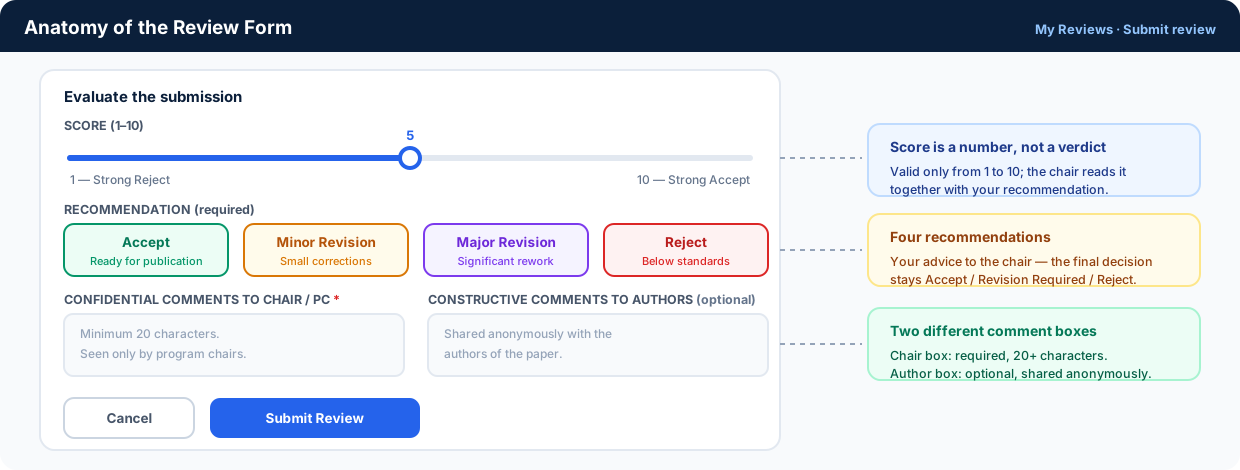
| Field | Rule |
|---|---|
| Score | Number from 1 (Strong Reject) to 10 (Strong Accept) — anything outside that range is rejected. |
| Recommendation | Required. Choose one of Accept, Minor Revision, Major Revision, Reject. |
| Confidential comments to Chair / PC | Required, at least 20 characters. Seen only by program chairs. |
| Constructive comments to Authors | Optional. Shared with the authors anonymously. |
A submitted review cannot be edited. The system stores each submission as its own round. If something must change, the chair requests a revision — you then receive a new round to evaluate.
4 Scores & recommendations
Your recommendation tells the chair how serious the problems are. The four options mean:
Accept
The paper is suitable for publication with little or no modification.
Minor Revision
Small corrections: language, formatting or a clarification of the argument.
Major Revision
Significant work: more analysis, methodological improvements, restructuring — then another review round.
Reject
Not suitable in its current form: lack of originality, technical flaws or out-of-scope content.
How the chair uses them
| Published decision | When the chair chooses it |
|---|---|
| Accept | Reviews support publication — the author may upload the camera-ready file. |
| Revision Required | Your comments point to real problems that a new version can fix; a re-review round opens. |
| Reject | The issues are too fundamental for a revision. |
Be specific in the confidential box: novelty, technical correctness, methodology and clarity. Actionable comments are what make a revision round useful.
5 Re-review rounds after a revision
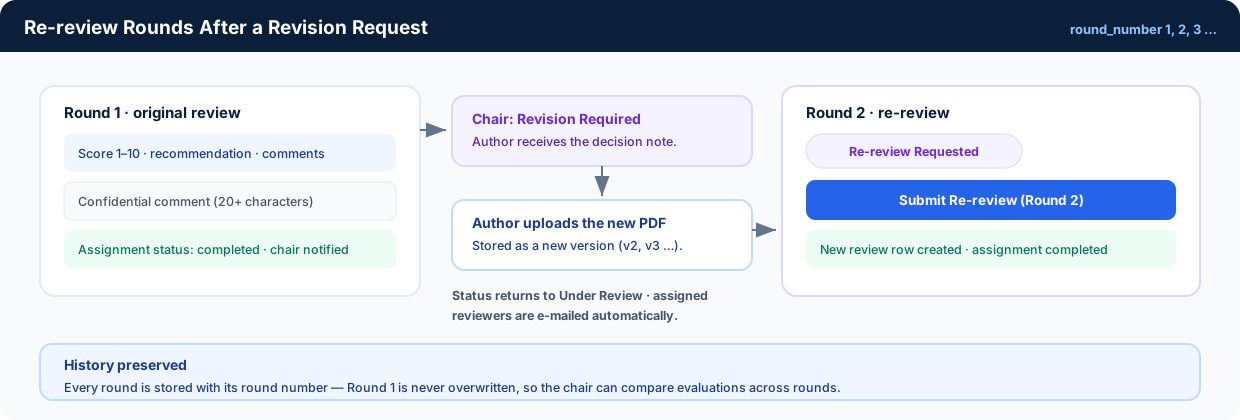
When the chair asks for changes and the author uploads a new file, you get a second round.
-
The badge changes
In My Reviews the paper now shows Re-review Requested and the action button reads Submit Re-review with the next round number.
-
Compare with your first review
Open the paper: your Round 1 comments, score and recommendation are still visible next to the new file.
-
Verify the requested changes
Check whether each concern was addressed, then submit the new round with a fresh score and recommendation.
-
The chair decides again
This loop repeats until the paper is Accepted or Rejected.
The status of such a paper is Under Review while the new version waits — assigned reviewers are e-mailed automatically the moment the author uploads it.
6 Ethics, blind review & deadlines
Double Blind review
- Do not try to identify the authors
- Do not contact the authors directly
- Do not share the manuscript with anyone else
- Do not search for or cite the preprint to unblind it
Conflicts of interest
The platform refuses to assign a paper to its own author. If you realise another link — same institution, a recent co-author, a direct competitor — decline the assignment and tell the chair so the paper can be re-assigned.
Deadlines
The chair sets a review deadline for the conference. My Reviews shows the papers waiting for you; submit before the deadline so decisions are not delayed for every author in that track.
Confidentiality is permanent. Everything you read as a reviewer — manuscripts, scores, confidential comments and decisions — stays confidential even after the conference ends.
7 Need help?
The chair of your conference
Questions about a specific paper, its deadline or a conflict of interest go to the organizer who assigned you.