1 Your paper's status lifecycle
A submission on Censula always shows one of five statuses. Knowing them tells you exactly what to do next.
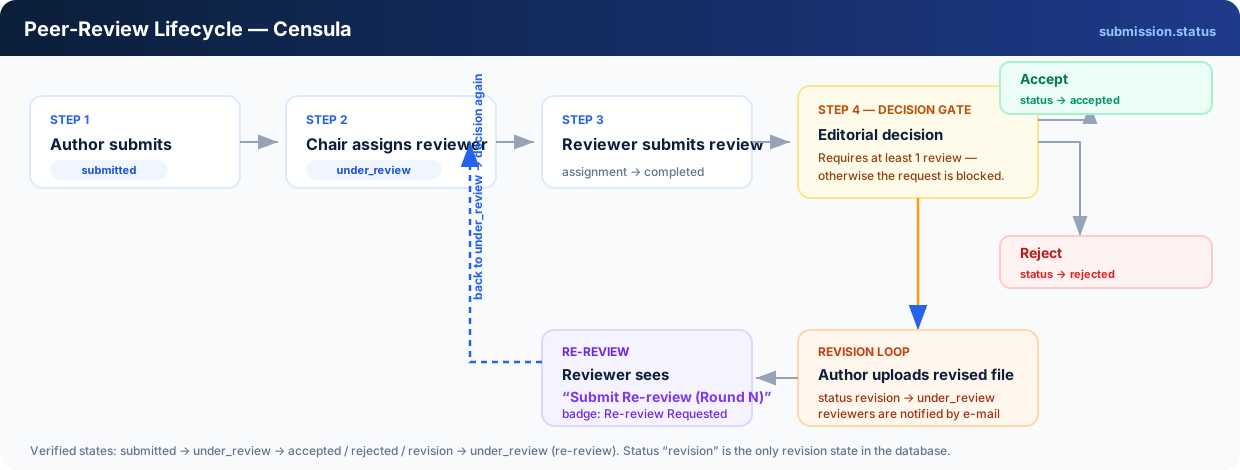
| Status | What it means for you |
|---|---|
| Submitted | Your files are uploaded, but no reviewer has been linked yet. Nothing is required from you. |
| Under Review | A reviewer is reading your paper — or your revised file is waiting for the next review round. |
| Revision Required | The chair asked for changes. Upload the new version before the revision deadline. |
| Accepted | Final positive decision. You can now upload the camera-ready file. |
| Rejected | Final negative decision, sent to you by e-mail with the chair's note. |
Every status change is e-mailed to you — after submission, after each assignment and after every decision, so you never have to watch the dashboard manually.
2 Find a conference
Before anything else, make sure the conference is actually open for submissions.
- Browse the public conference list on the platform, or
- Open the direct link the organizer sent you (also delivered by e-mail), or
- Search by conference title or acronym.
On the conference page, read the call for papers and confirm three things:
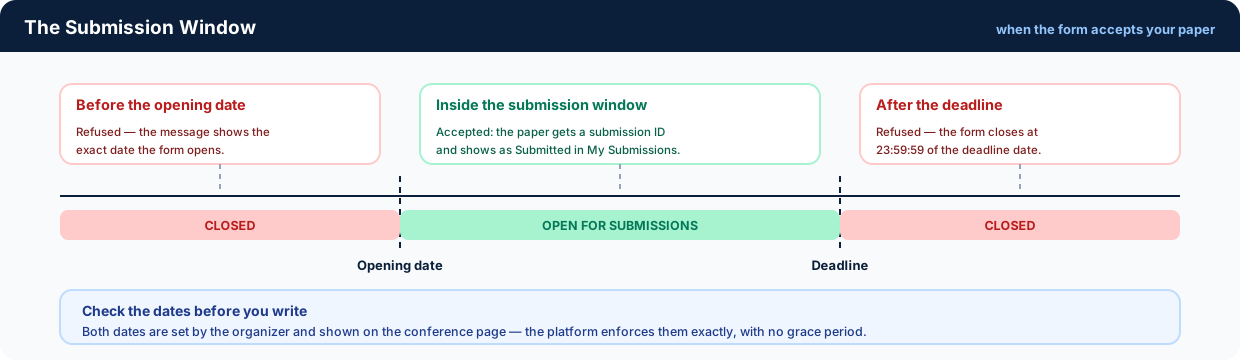
- Submission window — the opening date and the deadline (23:59:59 of the last day).
- Review model — Double Blind, Single Blind or Open Review (decides whether you need an anonymised file).
- Requirements — submission types, tracks, page or file requirements and any registration fee.
The submission form refuses anything sent outside the window and tells you the exact date: “Submissions for this conference open on 15 Oct 2026.”
3 Submit your paper
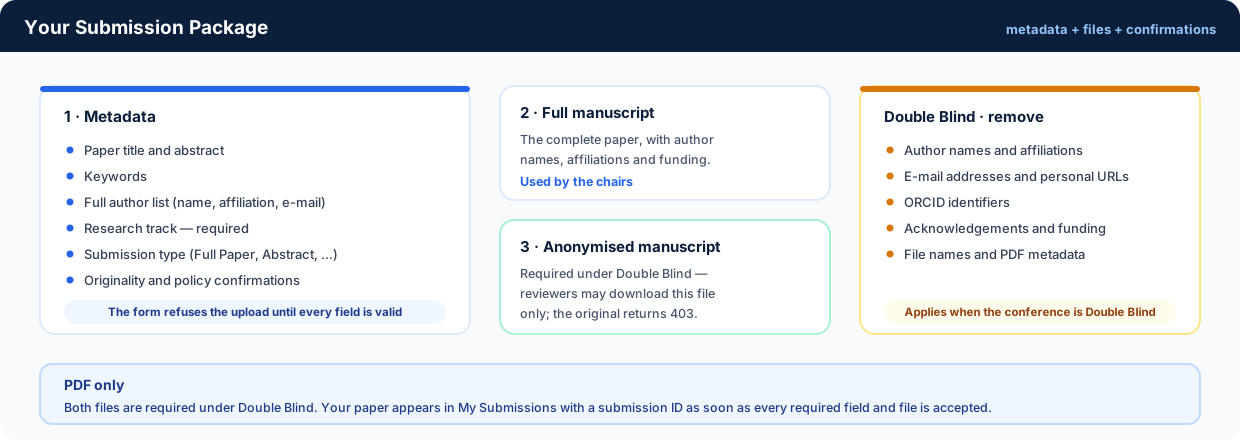
Open the conference page and press Submit Paper. The form has two parts: metadata and files.
3.1 Metadata
- Paper title and abstract
- Keywords and the full author list (names, affiliation, e-mail)
- Research track / topic — required; it decides which reviewers see your paper
- Submission type (Full Paper, Abstract, Poster, … as offered by the conference)
- The originality and policy confirmations — the form will not accept the submission without them
3.2 Files — PDF only
Full manuscript
The complete paper, including author names, affiliations and acknowledgements. Used by the chairs.
Anonymised manuscript
Required when the conference runs Double Blind. Reviewers receive this file only — the original manuscript is denied to them.
3.3 Prepare an anonymous copy
For Double Blind review, remove everything that could identify you:
- Author names and affiliations
- E-mail addresses and personal URLs
- ORCID identifiers
- Acknowledgements and funding information
- File names or document metadata that reveal the authors
When the upload succeeds your paper appears in My Submissions with the status
Submitted and a submission ID such as SUB-2026-014.
4 Track your submission
Open My Submissions to see the live status, the review round and your files.
-
Submitted
Waiting to be linked to a reviewer. No action needed.
-
Under Review
At least one reviewer is assigned. The chair reads the evaluations once they arrive.
-
A decision is published
You receive one of three outcomes by e-mail and on the dashboard: Accept, Revision Required or Reject.
- Accept — proceed to the camera-ready file (section 6)
- Revision Required — proceed to section 5
- Reject — the process ends for this paper; the decision and note stay visible in your dashboard
5 Respond to a revision request
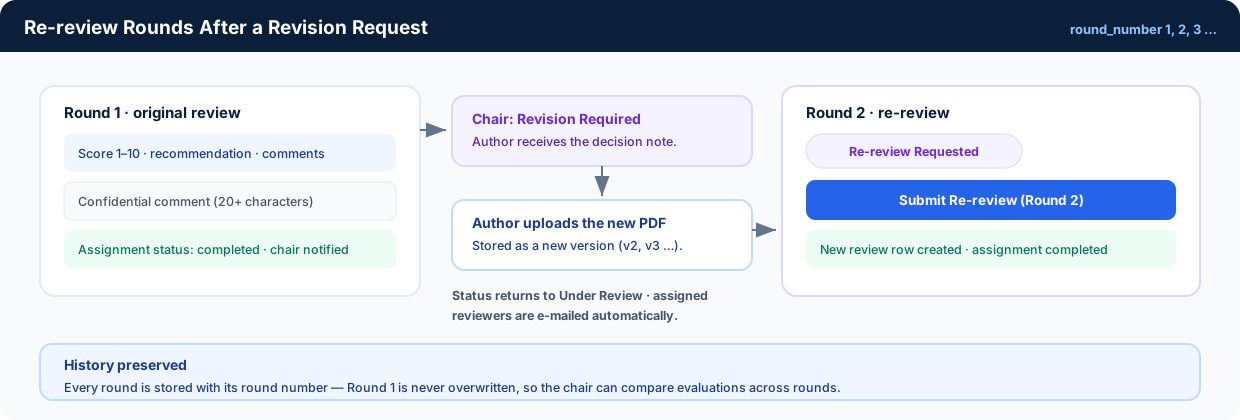
A revision is not a rejection — it re-opens the review loop for your paper.
-
Read the decision and the comments
Open the submission to see your decision note, the reviewers' comments to the authors and (if provided) the recommendation and score of each round.
-
Revise the manuscript
Address every requested change. For Double Blind conferences the revised file must stay anonymous unless the organizer tells you otherwise.
-
Upload the new version
From your submission page upload the revised PDF before the revision deadline. The status returns to Under Review automatically and all assigned reviewers are e-mailed that the new file is waiting.
-
The re-review round runs
Reviewers submit a new evaluation round (Round 2, Round 3, …) and the chair decides again. This repeats until you receive an Accept or a Reject.
Older versions are kept for the review history — they are never overwritten, so you can always compare what changed between rounds.
6 Camera-ready file & payment
Camera-ready upload
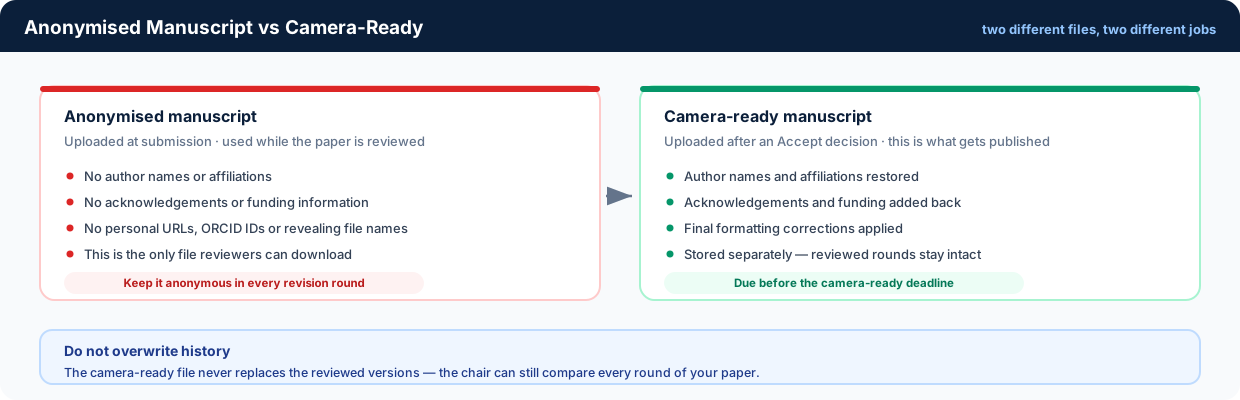
After an Accepted decision, open the submission and upload the final publishable version. Unlike the review files, this one contains all author information:
- Author names and affiliations restored
- Acknowledgements and funding information added
- Final formatting applied
- Camera-ready deadline respected
The camera-ready file is stored separately from the reviewed versions, so earlier rounds stay intact.
Registration fee & payment proof
If the conference enabled Registration Fee Verification, you will also need to:
- Pay using the organizer's instructions.
- Upload the transfer slip or receipt from your submission page.
- Wait for the organizer to verify it — the status shows Verified or Rejected together with the reason.
Whether a fee applies, and how it is paid, is decided entirely by each conference — check the conference page for the exact requirement.
7 Need help?
Frequently Asked Questions
Editing after upload, file replacement, missed deadlines, withdrawing a paper and more.
Open the FAQConference organizer
Questions about deadlines, fees, tracks or a specific decision belong to the organizer of that conference — use the contact address shown on the conference page.