1 General
What the platform is, who it is for and what an account gives you.
What is this platform?
Censula is a conference management platform: paper submission, double-blind peer review, revision rounds, editorial decisions, camera-ready upload and conference administration — all in one place.
Who can use it?
Four kinds of accounts:
- Organizers / Program Chairs — create and run the conference
- Authors — submit papers and track their status
- Reviewers — read assigned papers and submit reviews
- Participants — register for a conference and upload a payment proof when required
Do I need to create an account?
Yes. An account is required to submit a paper, review submissions, register for a conference or manage one. Reading this page and the guides needs no account.
Is there a fee to use the platform?
Using the platform itself is free. Individual conferences may charge a registration or submission fee — that fee is set by the conference organizers, not by Censula.
2 Organizer FAQ
Creating the conference, assigning reviewers and making decisions.
How do I create a conference?
Register as an organizer, wait until the account is activated, then open your Organizer Dashboard and run the six-step conference wizard. The launch checklist covers every field.
Can I edit my conference after it is published?
Yes — until the submission opening date arrives. Once Submission Open Date has passed, the settings form locks and the remaining dates cannot be changed, so review everything before that day.
How do I assign reviewers?
Open the submission's details page and pick reviewers from your conference reviewer list. Assigning the first reviewer moves the paper to Under Review automatically.
Can I remove a reviewer from a paper?
Yes. Use Manage Reviewers to remove or replace a reviewer before their review is completed.
Who makes the final decision on a paper?
The Organizer or Program Chair, in Review Decisions — never the reviewer. A decision can only be saved once at least one completed review exists.
Can I require payment verification?
Yes. Enable payment proof upload in the wizard; participants then attach a receipt or transfer slip, and you verify it from the dashboard before their registration counts as complete.
Full walkthrough, screenshots of every step and the review lifecycle: Organizer Guide.
3 Author FAQ
Submitting, file rules, revisions, camera-ready and status tracking.
How do I submit a paper?
Sign in, open the conference page and click Submit Paper. Upload the manuscript while the submission window is open — for double-blind conferences you also upload the anonymised copy.
Can I edit my submission after uploading?
Not directly. A submitted paper cannot be edited or replaced on your own; if the chair asks for changes, the status becomes Revision Required and you upload the new version from the revise page before the deadline. To change a file outside that flow, contact the organizer.
What file formats are accepted?
PDF only, up to 20 MB per file. DOCX, ZIP and other types are rejected by the upload form — convert your manuscript to PDF first.
What is an anonymous manuscript?
A version with no author names, affiliations, e-mail addresses, acknowledgements or any other identifying detail. Reviewers only receive the anonymised copy — links to the original file are refused while double-blind review is active.
What should I do if my paper requires revision?
Read the reviewer comments in your submission page, revise the manuscript and upload the new version before the deadline. A re-review round opens automatically as soon as the file arrives.
What is a camera-ready paper?
The final, polished version that appears in the conference proceedings. You upload it only after the paper is Accepted.
How do I know what happens to my paper?
Your My Submissions page shows the live status: Submitted, Under Review, Revision Required, Accepted or Rejected — and an e-mail is sent whenever it changes.
Can I withdraw my submission?
There is no self-service withdrawal. Contact the conference organizer and they will remove the paper from the review process for you.
4 Reviewer FAQ
Assignments, confidential files and what happens after you press submit.
How do I access assigned papers?
Open your Reviewer Dashboard. Every pending assignment is listed with the review form one click away; papers waiting for a re-review round are flagged so you can spot them first.
Can I download submitted manuscripts?
Yes, for papers assigned to you. Under double-blind review you receive only the anonymised copy — direct links to the original file are refused.
What should I do if I have a conflict of interest?
Decline the assignment immediately and tell the organizer, so they can give the paper to someone else. A conflict includes co-authorship, the same institution or a personal relationship with the authors.
Can I update my review after submission?
No. Once a review is submitted it is final. If the chair wants changes they request a new review round, which opens a fresh form for that paper.
What happens after I submit a review?
The chair collects all completed reviews for the paper and makes the decision — accept, reject or request a revision. You are notified again only if a re-review round is opened.
Reviews are confidential. Never share manuscripts, scores or comments outside the review process. Full details in the Reviewer Guide.
5 Payment FAQ
Applies only to conferences that require a registration or submission fee.
How do I submit proof of payment?
When the conference enables payment verification, an Upload Payment Proof action appears on your submission or registration page. Attach the receipt or transfer slip and wait for the organizer to confirm it.
Does the platform process payments?
No. Censula only stores the proof you upload. Payment itself happens outside the platform, by whatever method the conference organizers choose.
Who verifies payment receipts?
The conference organizer. Until they verify your proof, your registration stays pending.
Fees, refund rules and verification are set by each conference. Read the payment policy and the conference's own announcement before paying.
6 Technical support
Password, uploads, e-mails — and how to reach a human when none of that works.
I forgot my password.
Use the Forgot Password link on the sign-in page. A reset link is e-mailed to you — it expires, so request a new one if you wait too long.
I cannot upload my file.
Check the three usual causes:
- The file must be a PDF — other formats are rejected
- Size must stay under 20 MB
- Your browser and connection — retry, or try another network
I did not receive a system e-mail.
Look in Spam / Junk, check that no filter moves messages from
Censula, and whitelist support@censula.com. If nothing arrives after a
few minutes, the address on your account may be a typo — confirm it in your profile.
None of this helped — how do I contact support?
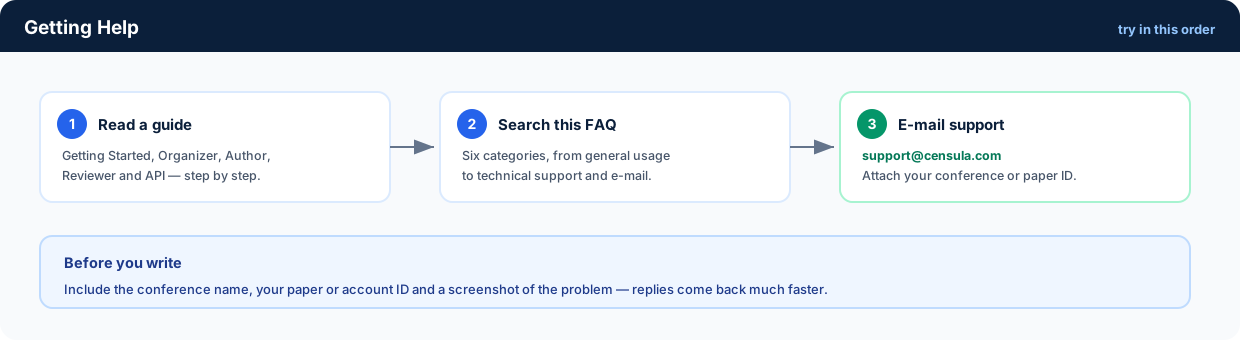
E-mail support@censula.com with the conference name, your paper or account ID, what you expected, what happened instead and a screenshot. That information usually cuts the reply time in half.
Still stuck after a reply? Reply to the same e-mail thread with your ticket details — do not open a second conversation, it only slows things down.