1 About the API
Censula API lets you retrieve conference and paper data from the system and display it on your website or feed it into another system — securely and in a format that is easy to consume.
Secure
API key authentication on every request; inactive or unknown keys are refused immediately.
Fast
Plain JSON responses that map directly onto your templates and components.
Complete data
Paper status, authors, submission dates, review history and pagination metadata.
Cross-domain
CORS header Access-Control-Allow-Origin: * for browser calls from any domain.
2 Getting started
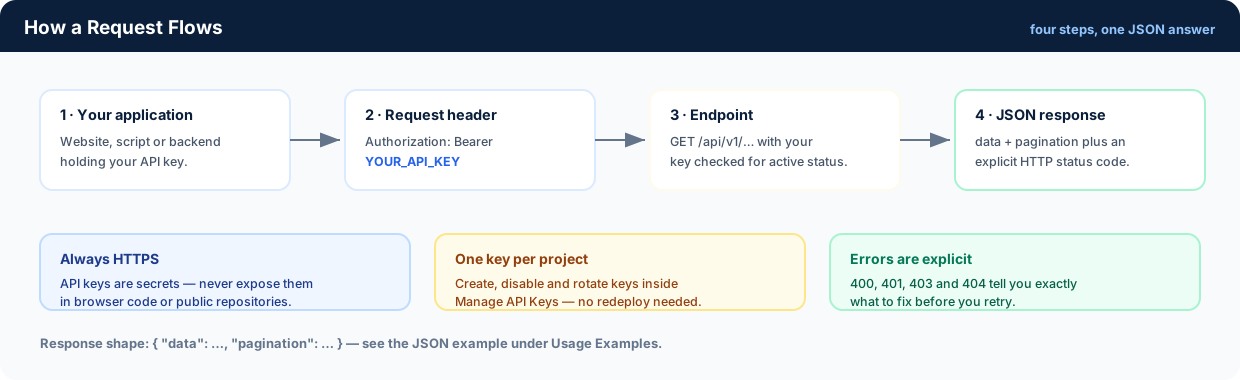
Create an API key, then send it as a Bearer token. Three steps and you are live.
- Open Manage API Keys and generate a key for the project you are building.
- Copy the key once and store it as an environment variable on your server.
- Send it with every request:
Authorization: Bearer YOUR_API_KEY
Welcome, Guest. Keep keys private, rotate them regularly, and never commit them to version control.
3 Usage examples
Four ready-to-run requests plus a complete PHP snippet and the JSON response shape.
Replace YOUR_API_KEY with your own key.
1 · Retrieve your conferences
curl -X GET "https://censula.com/api/v1/conferences" -H "Authorization: Bearer YOUR_API_KEY"
2 · Retrieve papers in a conference (with pagination)
curl -X GET "https://censula.com/api/v1/papers?conference_id=10&limit=20&page=1" -H "Authorization: Bearer YOUR_API_KEY"
conference_id, limit and page as needed.
Count the papers of a conference (PHP):
// ------------------------------------------------------
// 1. CONFIGURATION SETTINGS
// ------------------------------------------------------
$apiKey = 'Your_API_KEY';  // Replace with your actual API Key
$conferenceId = xxx;  // Replace with your specific Conference ID

// ------------------------------------------------------

// -- Function to count total papers --
function countPapers($conferenceId, $apiKey) {
    $url = 'https://censula.com/api/v1/papers?conference_id=' . $conferenceId . '&limit=1&page=1';

    $ch = curl_init($url);
    curl_setopt($ch, CURLOPT_RETURNTRANSFER, true);
    curl_setopt($ch, CURLOPT_HTTPHEADER, [
        'Authorization: Bearer ' . $apiKey,
        'Content-Type: application/json'
    ]);
    curl_setopt($ch, CURLOPT_FOLLOWLOCATION, true);
    curl_setopt($ch, CURLOPT_SSL_VERIFYPEER, false);
    curl_setopt($ch, CURLOPT_TIMEOUT, 10);

    $response = curl_exec($ch);
    $httpCode = curl_getinfo($ch, CURLINFO_HTTP_CODE);
    curl_close($ch);

    if ($httpCode !== 200) {
        return ['error' => 'HTTP Error ' . $httpCode];
    }

    $data = json_decode($response, true);
    if (!isset($data['data']['pagination']['total'])) {
        return ['error' => 'Invalid API response structure'];
    }

    return [
        'total' => $data['data']['pagination']['total'],
        'conference' => $data['data']['conference']['title'] ?? 'N/A'
    ];
}

// -- Execution --
$result = countPapers($conferenceId, $apiKey);

if (isset($result['error'])) {
    echo 'Error: ' . $result['error'];
} else {
    echo 'Total Papers in "' . $result['conference'] . '" = ' . $result['total'] . ' papers';
}
3 · Get conference details by ID
curl -X GET "https://censula.com/api/v1/conferences/10" -H "Authorization: Bearer YOUR_API_KEY"
10 with your conference ID.
4 · Retrieve paper details with review history
curl -X GET "https://censula.com/api/v1/paper_details/11" -H "Authorization: Bearer YOUR_API_KEY"
11 with your paper ID.
Example JSON response (papers)
// Response (JSON) with pagination
{
  "data": {
    "conference": {
      "id": 10,
      "title": "International Conference on Education, Technology and Innovation 2027"
    },
    "papers": [
      {
        "id": 11,
        "paper_title": "The Impact of Artificial Intelligence on Academic Conference Management",
        "status": "submitted",
        "submitted_at": "2026-06-10 19:35:04"
      }
    ],
    "pagination": {
      "current_page": 1,
      "per_page": 20,
      "total": 1,
      "total_pages": 1,
      "has_next": false,
      "has_previous": false
    }
  }
}
4 API endpoints
Core endpoints for conference and paper data — all read-only, all under /api/v1/.
| Method | Endpoint | Description |
|---|---|---|
| GET | /api/v1/conferences |
List your conferences |
| GET | /api/v1/conferences/{id} |
Get conference details by ID |
| GET | /api/v1/conferences/{id}/papers |
List papers of a conference (short path) |
| GET | /api/v1/papers?conference_id={id}&limit={limit}&page={page} |
List papers in a conference (paginated) |
| GET | /api/v1/paper_details/{id} |
Paper details + review history |
Pagination: limit and page
are supported by the paper endpoints; the response always carries the
pagination object (total,
total_pages, has_next,
has_previous).
5 Authentication
Every request must carry your API key in the Authorization header.
Authorization: Bearer YOUR_API_KEY
The server checks the key against the api_keys table: an unknown, disabled or
missing key is rejected before any data is read, and each successful call updates
last_used_at so you can see which integrations are alive.
Key hygiene
- Always use HTTPS for API requests
- Rotate your API keys regularly
- Use environment variables to store API keys
- Never commit API keys to version control
API keys are sensitive. Keep them private, never share them, and revoke a key immediately from Manage API Keys if you suspect it leaked.
6 HTTP status codes
Every response carries an explicit code — these are the ones the API actually returns.
| Code | Meaning |
|---|---|
| 200 OK | Request successful and data returned |
| 400 Bad Request | Invalid request parameters or format |
| 401 Unauthorized | Missing, invalid or inactive API key |
| 403 Forbidden | Valid key, but the resource belongs to another account |
| 404 Not Found | Requested conference or paper does not exist |
| 500 Internal Server Error | Server-side error (database or configuration) |
7 For administrators
Manage conferences, users, review settings and system configuration from the dashboard.
Questions about the platform itself? See the Organizer Guide, the Author Guide or the FAQ.